

Capabilities
Fighting Action
This capability has now been updated to give more fine-grained control over the number of people and fight intensity that you would like to detect. This enables us to provide you with more calibration options ultimately reducing false alerts.
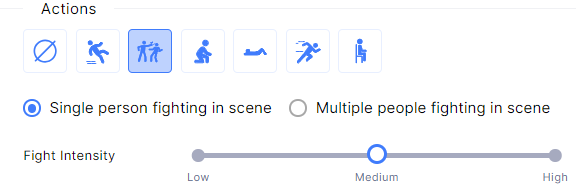
Our first differentiator allows you to trigger when there is more than one person fighting
Multiple people fighting - This will trigger a single alert for the whole fight scene and needs two or more people to be detected fighting
Singe person hitting (fighting) - This will trigger alerts per person fighting and only needs a single person in the scene detected doing a fighting action
The second differentiator we have added is a "Fight intensity" scale
The fight intensity scale allows you to set the minimum level of intensity you want to detect before the alert is triggered
As with all actions they are based on the skeleton of the person which needs to be a minimum of 140 pixels high in the camera scene to be detected
Bounding box's
The system has now enabled a bounding box for face detection in the alert evidence clip playback within the web. We do not layer the bounding box when the clip is downloaded for evidence so as not to tamper with the original video.
This capability is not yet available on our Protect Mobile interface
Stream Preview
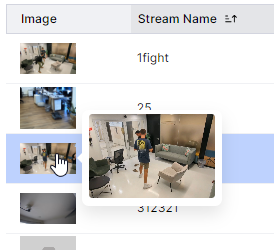
Until today the end user needed to preview the live camera stream to be able to see the field of view. This can use unnecessary time and resources.
Enabled quicker camera context by adding a still preview of each camera field of view, the context can be seen within the table of the streams page as well as when the stream is selected. You can also hover over the image in the table to get a larger image at any time.
The image can be easily refreshed by hovering over the image and selecting the refresh icon.
Stream Details
To allow streams to be easily manageable we have added an edit mode, this edit mode enables any defined camera details to be updated, including:
Stream Name
Stream URL
Stream Credentials
Custom stream FFMPEG calibrations
Single Credentials for Multiple Accounts
As requested by our partners who run and maintain multiple separate customer services, we have enabled the same SSO credentials to be added to multiple customer accounts. If the credentials are on configured on more than one account the system will provide a list of accounts in response to a login attempt which the person logging in can use to quickly select which account to login to.
Edge Device Self-Provisioning
To allow each customer to have a seamless an experience as possible our objective is to provide a completely secure fully managed edge device that allows plug-and-play capabilities without the need for complex IT.
We are happy to announce that our leading-edge device can now be fully provisioned directly from the Protect website with a single click.
Navigate to the device page and select + Create Device a wizard will open
Open your newly received Edge device and connect it to power and network
Copy the MAC address on the label into our web wizard and the process will be activated
The system will update on its provisioning status as it is being created and you have now registered your new device to your account
Granular Control over False Alerts Submission
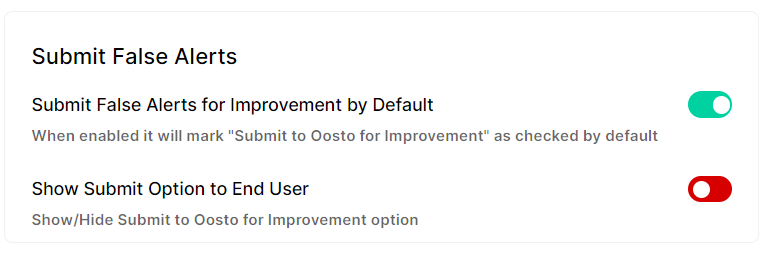
The system has always allowed any false alerts to be marked by end users. This allows a clear identification and filtering to be made for later follow-up. In addition to this, any false alert can be submitted directly to Oosto for analysis if so desired. Oosto never accesses customer data unless so indicated by customers.
This new capability allows a configuration in the system that determines how false alerts are handled after they have been marked as false alerts.
Show hide option to submit false alerts to Oosto
Default option to submit false alerts to On/Off
Network Details
As a network administrator connecting the new edge to the network and having multiple edges we understood the need to be able to see which Edge is in which location in the network. This can allow easier management.
Within the devices page, you can now see the device's IP addresses including Internal and external IP's
Performance and Stability
Our service provides world-leading performance at the edge enabling 5 camera streams to operate with our full suite of video analytics capabilities on a standard Jeston Orin NX.
With this release, we have improved even more
30% reduction in power usage
Improvement in our video pipeline to reduce dropped frames
Watchdog improvement enabling better stability
Oosto Protect Mobile
Protect Mobile has now launched enabling customers to receive alerts directly to IOS and Android devices.
Multiple bugs fixes
Alert details were augmented to provide better visibility
Filtering of alerts is now possible