

This update also introduces a more capable and responsive UI with high-speed data grids, update detection quality, and integrated third-party camera ID mapping.
Key Highlight
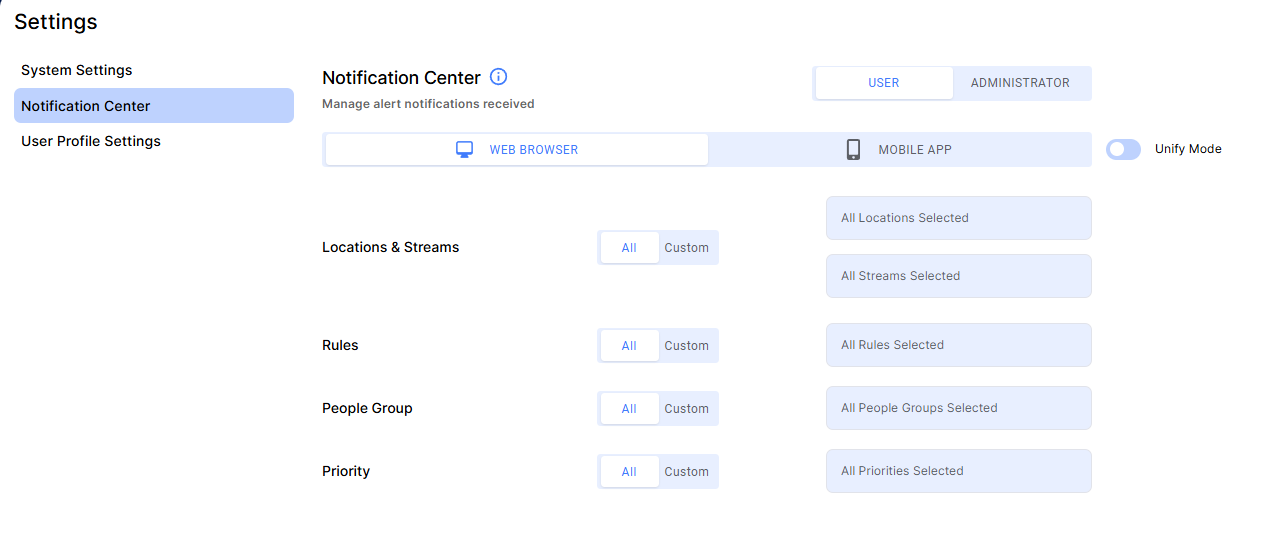
Introducing the Notification Center
We’ve launched a new notification engine that gives you total command over where and how you receive security alerts.
All-New Web & Mobile Filtering: For the first time, you can enable and filter alerts. This can be applied to both Web or Mobile together or individually allowing independently control. Stay informed with full detail at your desk while receiving only high-priority pings on the go.
Notification Dashboard Filtering: You can now quickly filter your main dashboard alerts using your web Notification Center settings. This allows you to view a streamlined feed containing only the specific alerts you are assigned to monitor.
Granular Alert Control: Choose exactly which security events trigger a notification, ensuring your feed stays relevant to your specific role.
Centralized Admin Notification Control: Administrators can now configure and enforce notification settings for end users.
Bulk Deployment: Apply alert rules across entire teams or specific user groups in one go.
Lockdown Capabilities: Admins have the option to lock these settings, ensuring organizational compliance and preventing users from overriding critical security protocols.
Instant Incident Verification & Third-Party Sync
We’ve removed the friction between reviewing a historical alert and taking action. Whether you are using Protect web / mobile or an external tool, you can now verify incidents in real time.
One-Click "Switch to Live": When reviewing a recent alert, a single click instantly transports you to the live camera feed. This streamlined workflow allows for immediate verification of ongoing incidents without ever leaving the alert context.
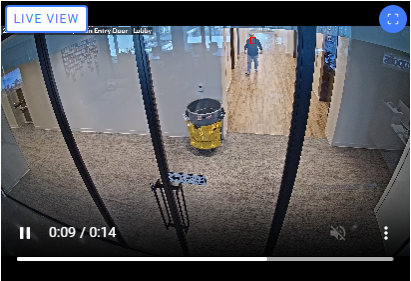
External "Switch to Live" Integration: Our new Flexible External ID Mapping extends this capability to your entire security stack. By mapping internal streams to External IDs, the system now pushes these specific identifiers via Webhook. This allows third-party platforms to utilize the ID and trigger a "Switch to Live" or "Switch to Playback" view directly within their own software.
Modernized Interface & High-Speed Data Grids
We’ve overhauled how you interact with data, focusing on speed and a cleaner, more intuitive layout.
Fluid Data Grids: Our new grids are fully responsive, automatically adapting to your screen size for a consistent experience.
Enhanced Column Control: You can now resize, reorder, add, or remove columns, all changes you make to your layout will be automatically saved to your profile.
Precision Data Control: Take total command of your view with built-in sorting, filtering, and column resizing, allowing you to organize information exactly how you need it.
Built for Scale: New pagination and optimized filtering logic ensure rapid load times and smooth operation, even when handling your largest datasets.
Protect Mobile Updates
Welcome to our new rebranded Metropolis applications, we’ve updated the app to give you more control and faster access:
Multi-Hierarchy Locations: We now support complex, nested location structures for seamless organization across your properties.
Notification Filtering: Reduce the noise by filtering your notifications. Note: Filters are currently managed via the web portal; in-app administration is coming soon.
Instant Live View: React faster by switching directly to the Live feed straight from an incoming Alert.
Algorithm and Quality Improvements: More Accurate, Robust Detections
We’ve improve the accuracy and robustness on how the system evaluates facial data, replacing the old scoring method with a more advanced quality assessment.
Intelligent Quality Scoring: Our new evaluation network analyzes factors like blur, brightness, and noise to provide a single, highly accurate quality score.
Cleaner Enrolment & Rules: By filtering out low-quality data at the source, the system ensures more reliable enrolments and significantly reduces false-positive alerts.
Reduced Noise: This improved scoring ensures that only high-value data triggers actions, allowing you to focus on legitimate security events.
The new approach is the result of over two years of dedicated research. While we've worked to align the new scores as closely as possible with the old ones, our primary goal is to provide better overall detections. This means you may see different results than before, as the new algorithm is designed to significantly reduce false alerts and provide more accurate assessments. We recommend re-examining your system thresholds to ensure they align with your specific use case and expectations.
See full changelog Here